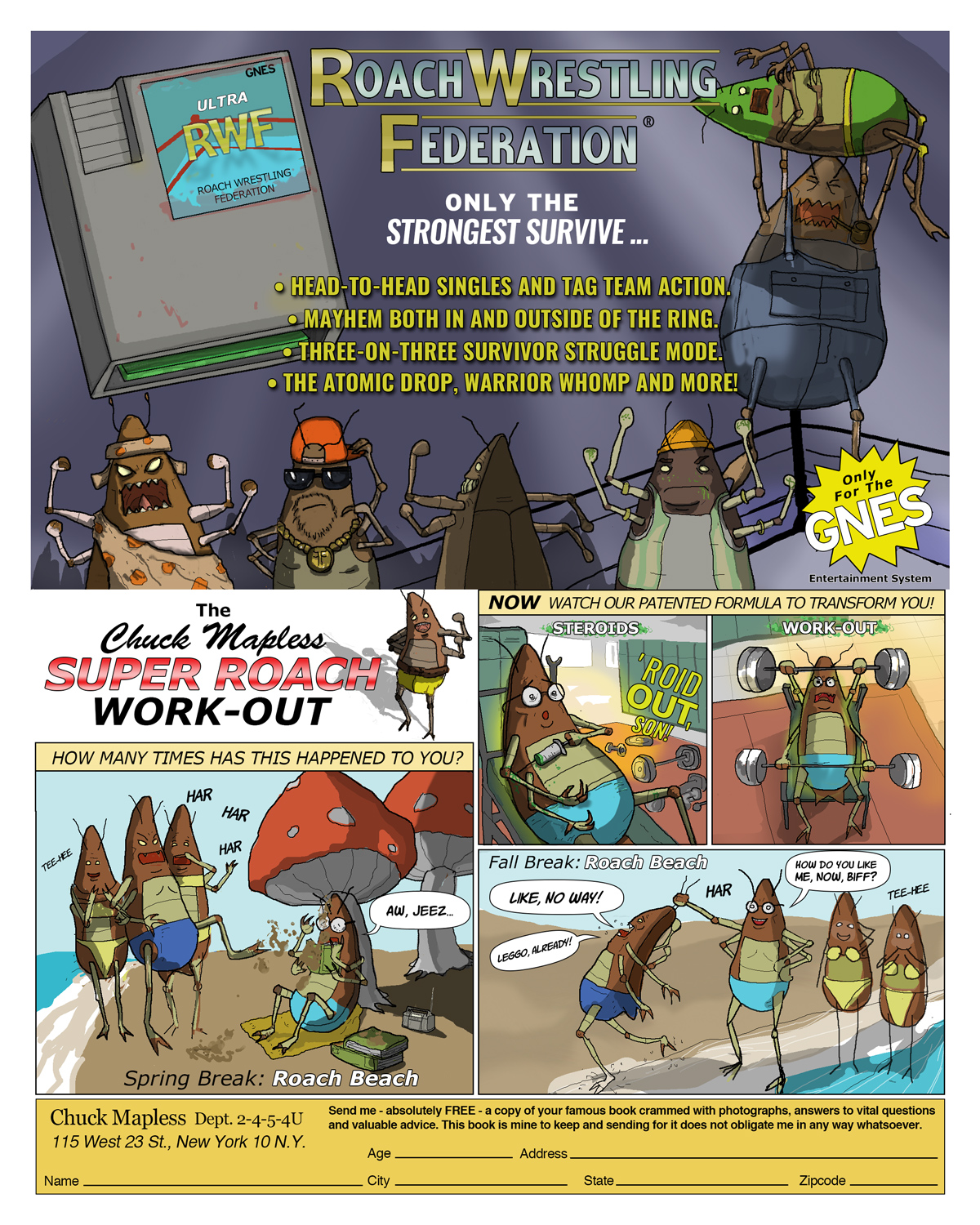
Sea Monkeys, WWF and Charles Atlas Parody Pages DC And Marvel Comic Ads For Rip-Off Products
Ads were everywhere in Marvel and DC comics. I started noticing them in comics from the 1960's X-Men. The X-Ray specs, sea monkies, and strange Hostess ads with the Hulk or Spider-Man were usually badly printed two-toners. Later, there were ads in the 1990's for Nintendo characters and games.
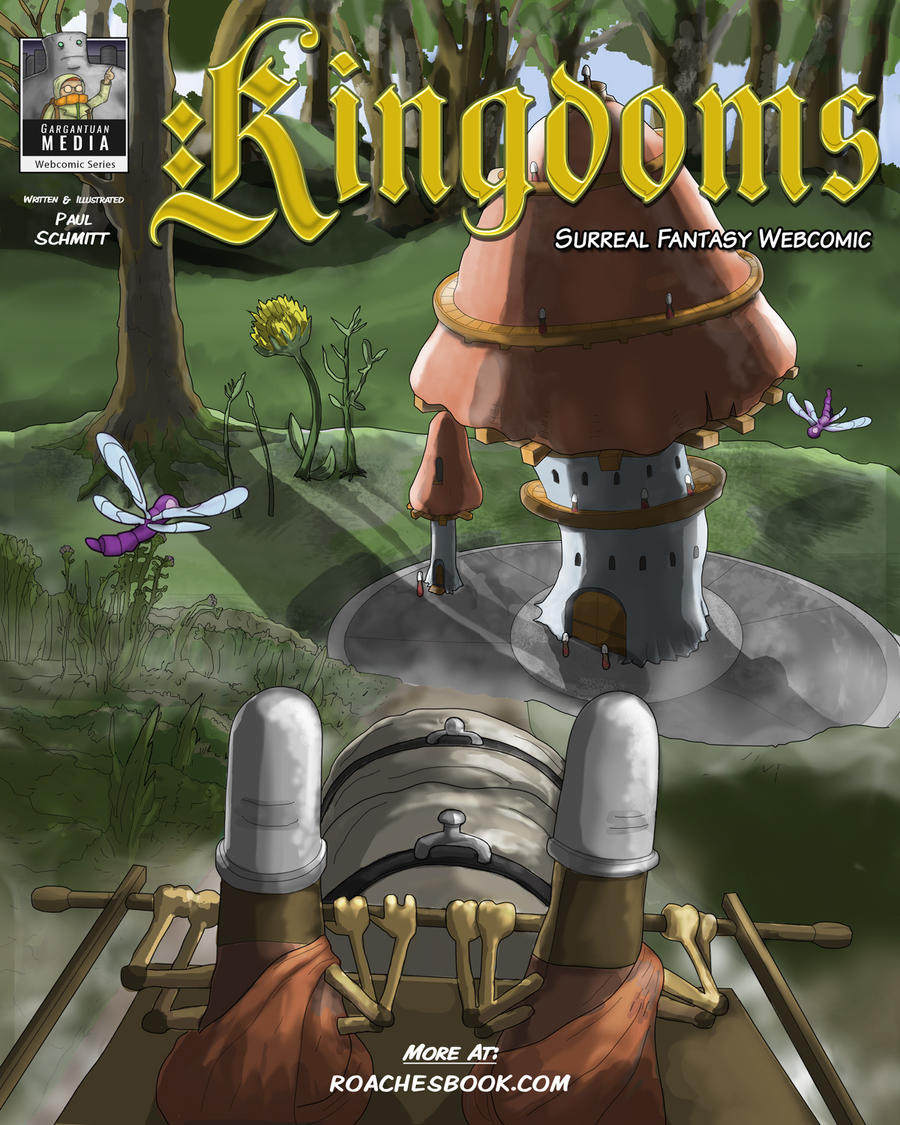
New Surreal Fantasy Webcomic Warring factions in the insect kingdoms fight for a valuable prize.
Kingdoms is an adventure webcomic with cartoony charters. The wars and battles contain insect blood, gore and violence. Kingdoms takes the lead character from the first book, The Grand Roach, and sets up a story with him as King and the leader of a belligerent roach army. I am planning on releasing the first two chapters. Then, I'll release the third chapter pages weekly.
The new idea for this story got itself together on a giant drafting table in my first studio space that I set up here when I got back into Indiana.
The first chapters feature medieval warfare with arrows, bows, spears... I've currently finishing the webcomic pages in Photoshop using an extended version. It has better brushes to digitally ink and color than Illustrator could do in a timely manner.
Let me know if you like the bug guts or if the action scenes are too much, or perfect, or what.
Tricks, Tips And Techniques Shortcuts To Make Your Own Dialogue Driven Animation Adding high quality lip sync to your animation can be easy with these techniques.
The hardest part about lip sync in 2d is finding and then setting up the right tools for your film. I worked in with both Flash and After Effects to find the simplest method for me to animate a lot of dialogue. Flash CS4 won out due to the flexibility of the lip syncing tools.
I'd like to show you a couple of images and menus that I'm using to animate my short. These steps will get you set up to animate your own dialogue.
A. Setting Up The Imagery Diagram A-1. The Illustrator file is made up of individual parts on a series of layers.
Using Illustrator, I've created an AI file containing many layers for each part of a character that I want to animate. The most important parts such as eyes, brows and mouths are each on separate layers.
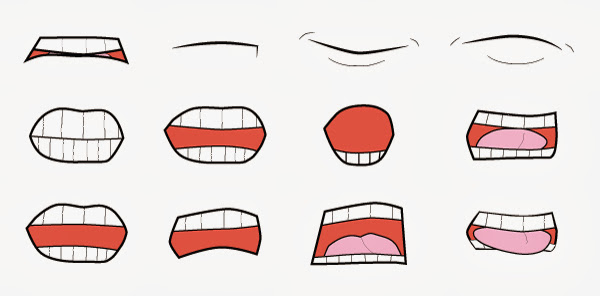
Diagram A-2. Vector mouths are laid out for each type of sound and shape I plan on animating.
Above is a look at an isolated shot of the mouths. These vector mouths will be aligned to one central point in Illustrator before importing them into Flash. This way, they all appear to be opening and closing at the same spot in space. After aligning the mouths, I've saved the entire image as a CS4 AI file so that my copy of Flash CS4 will be able to import as clean vector art.
B. Setting Up The Layers.
We have to take the art made in Illustrator and translate that information to Flash. Since they are both vector programs from Adobe it is very simple - provided you are using the same generation of product. Time to open Flash and find your own Illustrator file.
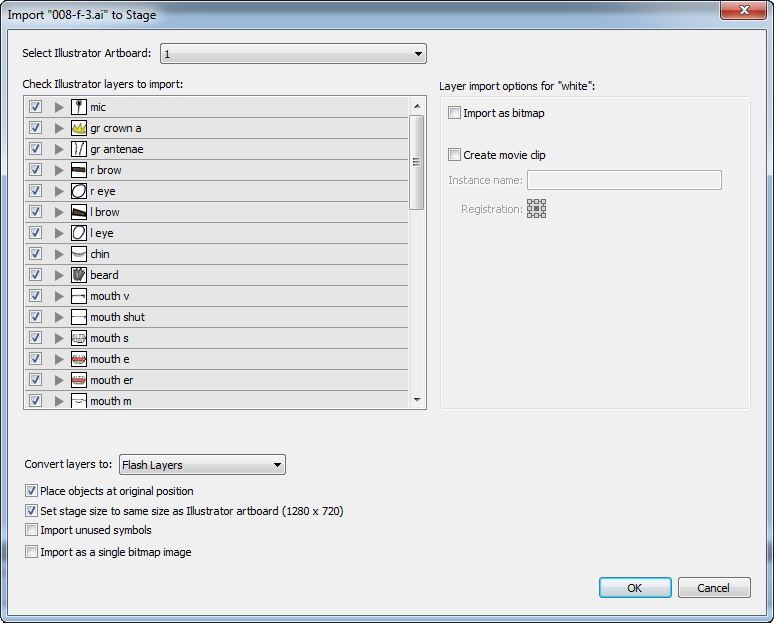
1. Import your entire image file to the Stage with File > Import To Stage.
2. In this dialogue box, you can see each part and layer of your image. Flash will recognize each layer and the name you have given these layers in Illustrator. Flash will make a layer that corresponds to each one on the Timeline. Make sure nothing is hidden or unchecked that you need and click OK.
Diagram B-1. Flash's Import settings interpret every shape as either a layer, group or shape.
Now we have the whole vector image in Flash on multiple layers to animate. See Diagram B-2 for how this will look.
See the folders in the Timeline? We will get to that. Just make a mental note for now.
Next, we need to combine the most important parts of this drawing and then isolate the parts we need to animate into symbols. These symbols will live in the Library. They will be made and aligned in the spot that they were imported at, on the Stage and the Timeline.
1. Select your background imagery layer and group it. It doesn't need to be a symbol for this demo.
2. After the background is grouped, lock it's layer with the padlock icon in the Timeline.
3. Next, we need to convert the character's various parts, on their individual layers, into Graphic Symbols.
4. First find the multiple mouths layers. Make each mouth into a symbol by selecting Modify > Make Symbol or Ctrl+F8. Make these symbols into Graphics - not Movie Clips. Name each symbol after the sound that they make such as "Oh" or "P" or "B".
5. On the Timeline, delete all mouth layers but one. This layer contains only one mouth Graphic symbol.
6. These mouth symbols now live safely in your Library as a symbol that can be edited any way that you want. I suggest you divide your Library into several sections to organize your art as you make each of your own symbols.
See Diagram B-3 below for how I organize my work in my own Library.
Diagrams B-2 and B-3. B-2 shows the mouth layer highlighted in the layers on the Timeline. B-3 shows the Library sorted into folders that separate important art from miscellaneous components.
7. After making each of the mouth Graphics you need to make symbols for every animated object in the scene.
This is a list of the major symbols used in this clip that live on the Timeline and in the Library. You should set up your own character in a similar way.
a. Body symbol layer.
b. Right and left arms in folders containing symbols for hands, fore arms, and biceps.
c. Right and left eyes and brows symbols in folders on individual layers.
d. Antenna symbol layer.
e. Chin symbol layer.
f. Beard symbol layer.
g. Mouth layer with one mouth symbol on it.
8. Remember your mental note for the folders in B-2? It's time to make new folders in the Timeline to contain the arms and eyes. You should have a left arms folder, right arms folder and an eyes folder (see B-2). Each folder contains the parts that make up each object.
9. Now, in the Library, make folders for each set of parts such as arms, eyes and mouth. Sort these symbols out and into their own respective folders (see B-3). The mouth folder is the most important. Without a mouth folder you will be crying by the end of this demo. See B-3 for Library folders.
Please note that folders in the Timeline and folders inside of the Library are nearly identical. They organize multiple layers in nearly the exact same way. You will need the folders in both panels to keep organized.
The difference between Library and Timeline symbols is that the symbols in the Library are GLOBAL symbols. Anything you do to edit the Library versions will effect every "instance" of that symbol on the Timeline. This is important to understand. We only want to edit on the Timeline for this demo - not the Library.
Now that we have our Timeline layers and Graphic symbols set up - we need to address sound and then start the animation.
C. Set Up To Import/Export Sound
The highest quality of sound needs to be used for the final product. By default, as you begin you are working with Flash's low quality version of audio that isn't previewed on the Timeline. We need to make some changes so that we can "scrub" through the Timeline to note each sound.
1. Create a new layer in the Timeline called "sound".
2. File > Import To Stage and add your WAV or AIF file. Do not use MP3 files. They are not a viable format to make animation with.
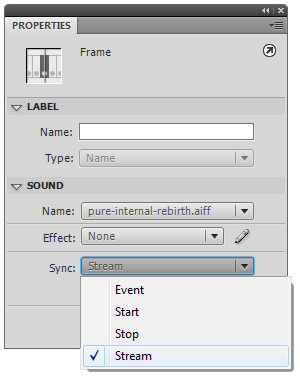
3. Select the sound on the Timeline and go to the Properties dialogue box. Under "Sync" change the setting from "Event" to "Stream". See diagram C-1 below.
Diagram C-1. The sound's ability to be previewed can be changed in the Properties panel.
This step will allow Flash to do real-time previews of your voice over or sound effects. When you export it to a movie (Ctrl+Enter) you might hear a clear difference in the audio quality. We don't want this low quality version to be our final product.
We can fix this so that the published movie has better audio automatically without shifting back and forth in the sound files audio properties.
1. Open the Publish settings under File > Publish Settings.
2. Open the Flash tab.
3. Look for the Image and Sounds settings.
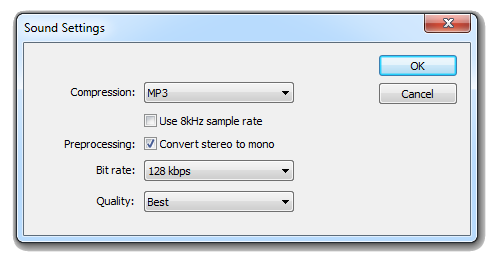
4. Notice that, by default, the settings are in MP3, 16kbps and Mono for audio during Events and Streams. Click "Set" for both Event and Stream.
5. Change the settings to MP3, 128kbps and Stereo. Make the quality "Best". See diagram C-2.
Diagram C-2. The sound quality in Flash can be changed in the Publish Settings panel.
Now you have a preview version in Flash that sounds good and can be worked with. Plus, your final version will sound great too.
D. Setting Up And Animating The Mouth
This is the trickiest part. We need to use the waveform to identify each individual part of the dialogue. Dope or exposure sheets can be helpful in understanding each part of the words. However, you will need to find each second or millisecond these sounds occur if you use dope sheets. The only way I have found to do so is my opening a video editing software, like Premiere, and marking each word down.
This was far too tedious for me to do. I don't suggest you do this either.
Diagram D-1. Save time by noting the keywords inside of the Timeline.
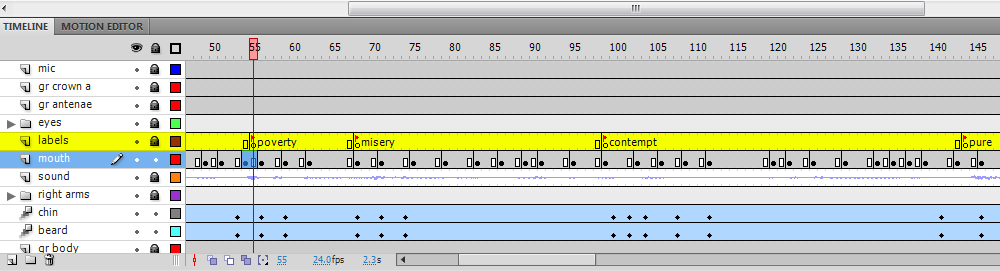
The best way to clearly mark dialogue is by building in your own labels in Flash. You will not be able to write in every word. However, you will be able to mark the key points in the dialogue in which your character will be most active. See diagram D-1.
As you can see, I have set my frame rate to 24 fps. I've looked at the waveform and scrubbed to find the four points in the audio track and then marked them. The words in between these keywords will be represented by the rest of the symbols in my Library. But first we need to mark our keywords.
1. Make a new layer in the Timeline above your mouth and audio track layers. Name it "labels".
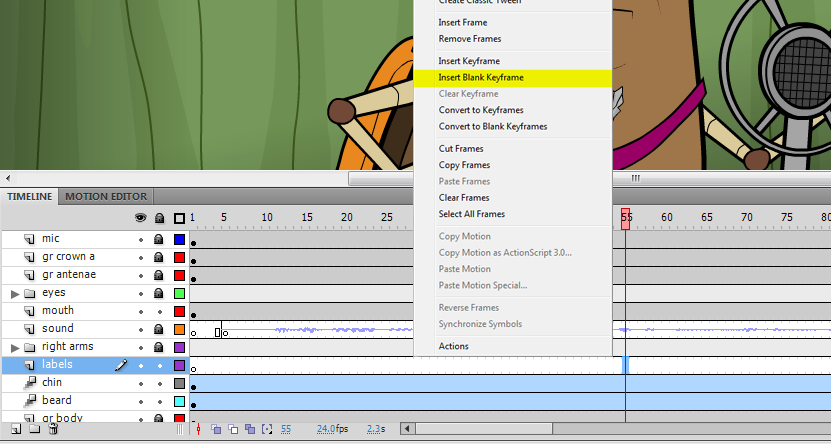
2. At the first keyword point, frame 55 in this case, right click and select "Make Blank Keyframe". See Diagram D-2.
Diagram D-2. At the time that the first keyword appears we want to set a blank keyframe and then label it.
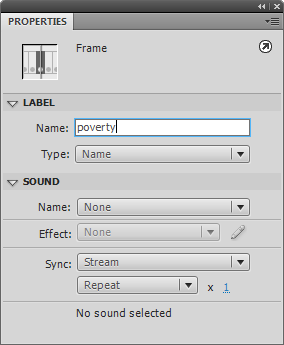
3. With this frame selected, by right clicking, go to the Properties menu. Under "Label" type in the word. In my case "poverty". See Diagram D-3 for these locations. In D-2 you can see where this keyframe is located.
Diagram D-3. In the Properties panel, we name the first keyword in the labels layer.
4. Repeat the process of making a Blank Keyframe and naming it for each important word. There should only be a few words you want to have your character emphasize.
Now we are ready to go! You will be surprised at how easy it is now that all the set-up is over.
Time to start replacing the mouth symbol for each syllable. This method is a lot like stop motion animation. Let's start by going to our first keyword "poverty".
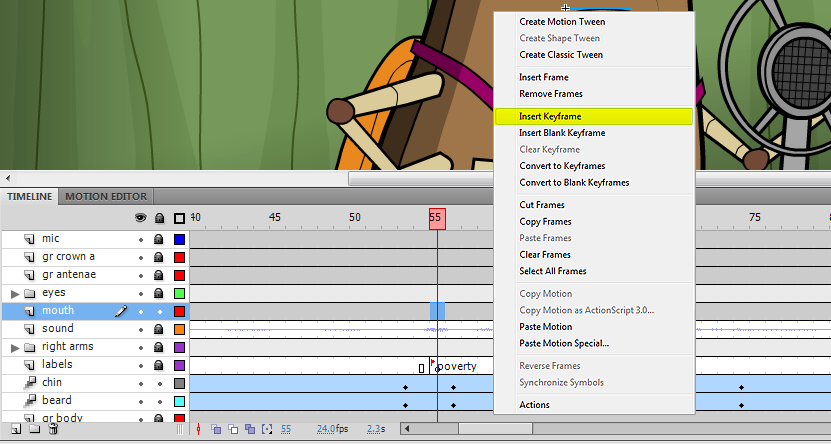
1. At the frame marked for the start of the first keyword on the labels layer, right click on the corresponding frame on the mouths layer. In the contextual menu, select "Insert Keyframe". See D-4.
Diagram D-4. At the time that the first keyword appears we want to set the first mouth keyframe.
We need the closed mouth preparing to make the "PAH" sound in the word poverty here. This symbol lives in the mouth folder in our Library. We don't want to throw this symbol the Timeline! It will not be aligned correctly. Instead, we will use the Swap Symbol function built into Flash for this task.
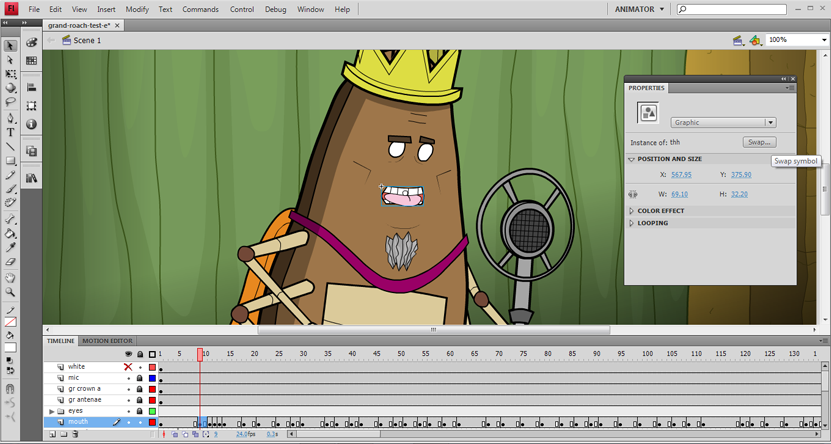
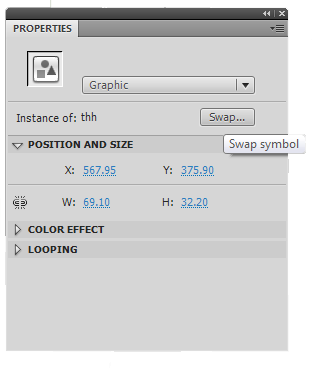
2. On the Stage, select the keyframe you've just made. In the Properties panel, find the Swap button. See D-5 below.
Diagram D-5. The Properties panel contains the Swap button. Use it to replace the mouths in your animation.
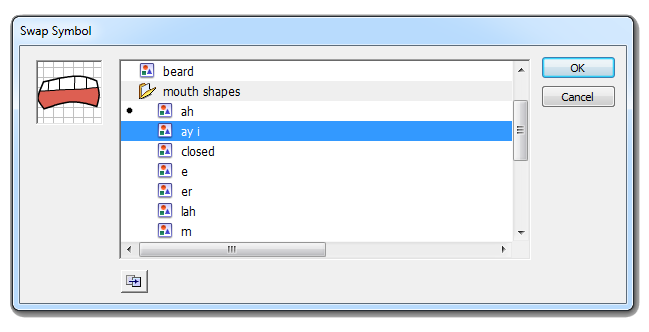
2. The Swap Symbol interface is up and asking us which symbol we want to get. This is a direct reflection of the mouth folder in your Library. Locate your mouths folder and look for the appropriate symbol. Click OK.
Diagram D-6. The Swap Symbol panel contains all of the mouths in your Library file.
3. The mouth symbol has been replaced by the appropriate symbol for the sound being made.
Now you have started building a keyword from a well-organized Library. The rest of the steps involve finding the right shape in your Library and keyframing it in using Swap Symbol. I've gone ahead and animated the mouth using this technique. I've also added some animation using the Motion Tween and Motion Editor, to be demonstrated later, and came up with this clip.
That's the demo. I hope you kept up with each step. It can be intense but it provides some really efficient results. Please let me know if you have any problems with your own animations while using this these techniques. Thanks for reading.
21st Century Opera Is Sung With Bodyslams "Whatcha gonna you do when Roachamania comes for you, brother?!?"
In the squared circle, an insect is tested by all forces. Strength and determination are the only weapons he can wield. He stands alone in a darkened world of foes inside of a faceless arena that howls for his blood. Will this brave bug stand or will he fall?
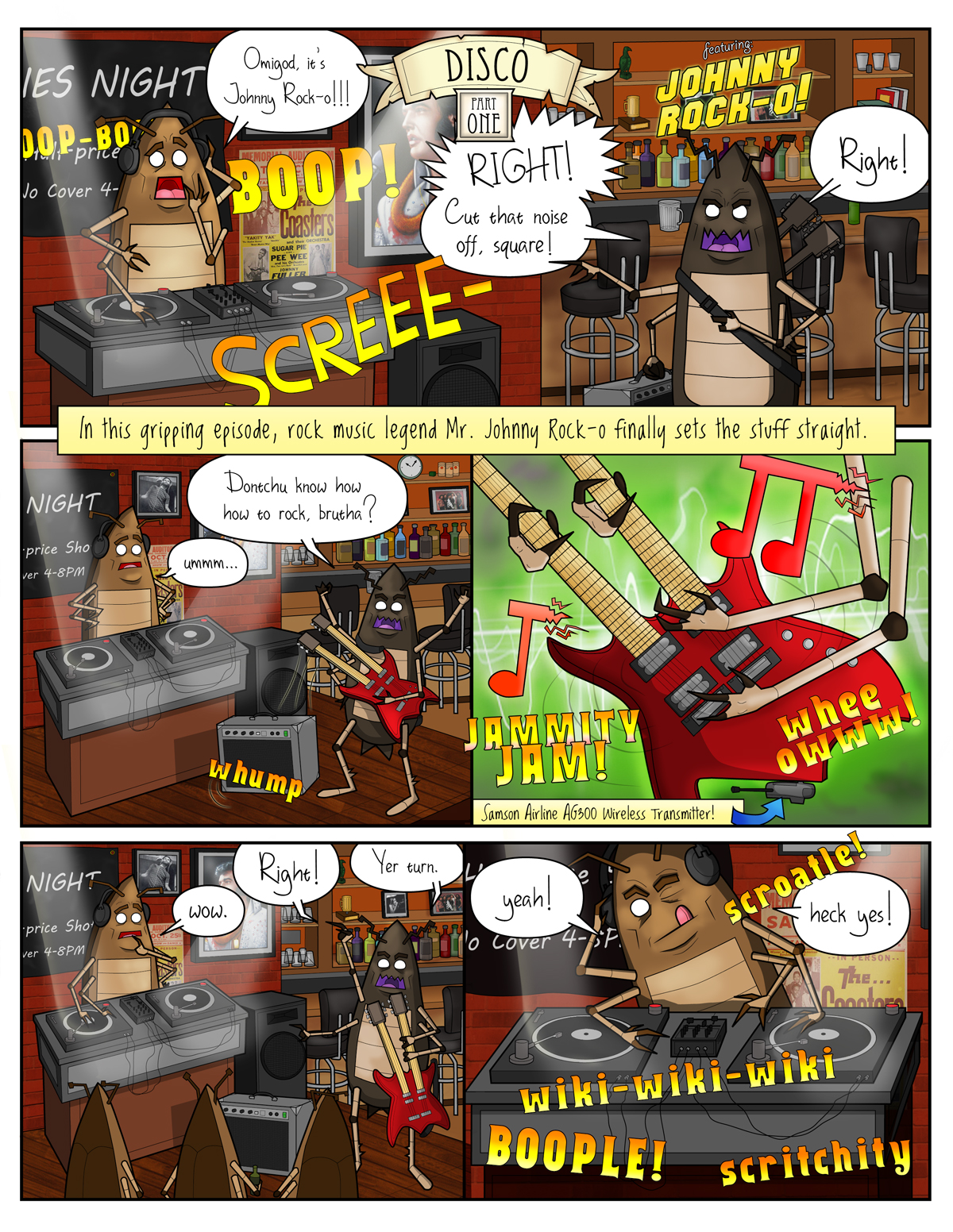
Rock 'n Roll Roach Versus Disco Roach Why and How 1's And 2's Can't Deal With 3's And 4's
As soon as the turntables and the Cold Play hits your favorite rock 'n roll club - duck for cover. Things are about to take a sudden left turn.
Bars and clubs grow to a point where they book great regional and national acts that draw quality crowds. Alt-rock/punk/rock-a-billy road warriors drive in from all over the country to rock the house. A club at it's peak is something to experience.
Then, all of the sudden, that stops. The next thing you know: one guy is spinning records, terrible dance pop records that pose the existential question: "Do you believe in life after love?" On Friday and Saturday night. At the same club. The one that had all the good rock bands for years...
So, what happened to your rock club? Instead of talking with a wide range of people from all over the country you end up with a identical crowd of the drunk Cher lovin', Madonna boogeyin' yuppie tool bags from the "right" side of town packed in 300 deep. 220 of them have their phones out at all times like Star Trek tricorders being used to carefully navigate a class M planet.
Your favorite rock club is now a very large phone booth (remember them?) that is playing bland Muzak. Just like that.
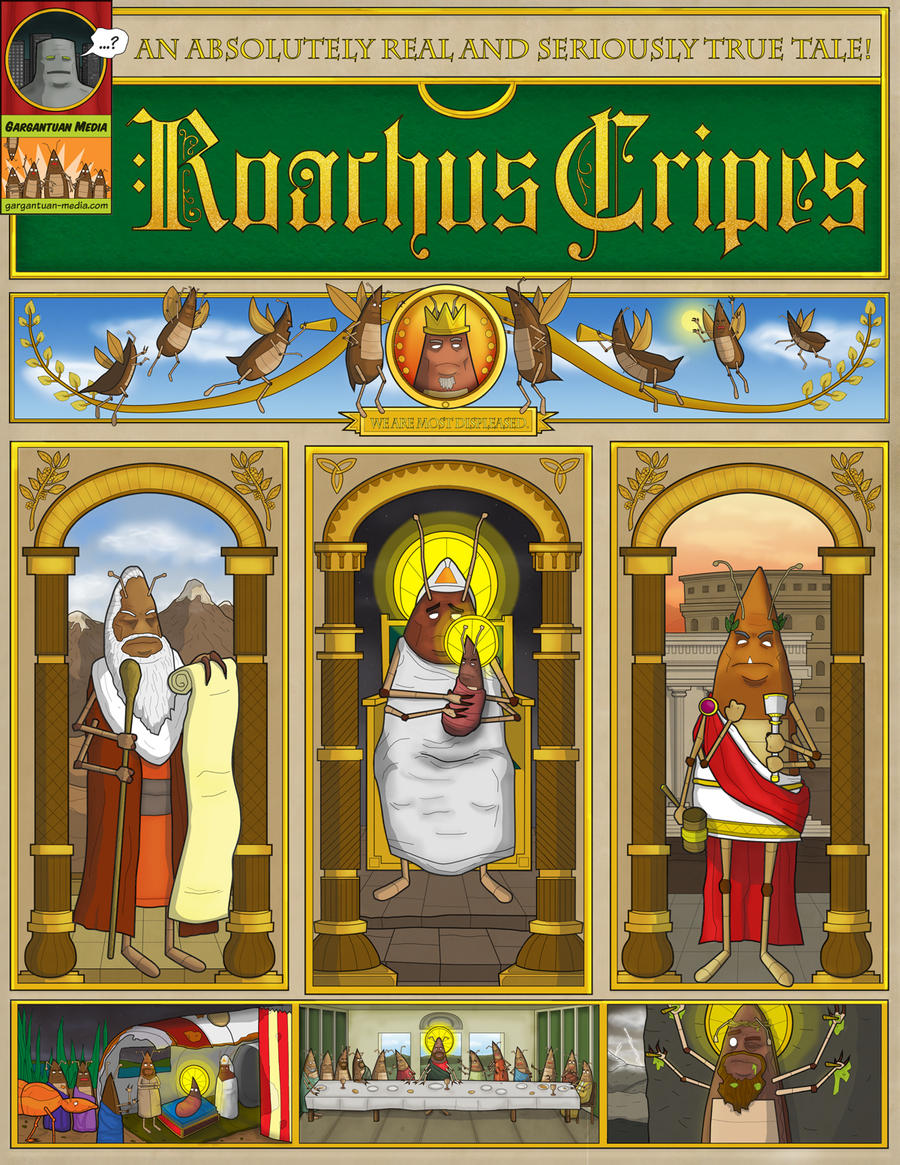
A Small Bug From The Burbs Makes A Big Splash How He Was Squashed For Your Sins And Why
A 24 Hour Comic gone horribly wrong. Made in Speedway, Indiana outside east of Indianapolis, Indiana.
To make matters worse: this crazy poster idea will end here. Be glad that I didn't post any more of the crucified roach sketches at the bottom right side.
Social Studies In Roach Culture Why Can't These Bugs Seem To Get It Together?
When is this title not about biting perspective on cultural elitism? It works out that way a lot. Even when America is moving from a 1st world country towards a 3rd world country we still cling to our notions of superiority!
And us poor "hipster" bastards are aware of it. The only times we seem to get above the drag towards ruin that the country is clearly caught up in, in any obvious way, is in one or two places where we don't feel like a sweatier version of Quasimodo! These places are almost always bars and coffee shops.
Upcoming Guest Strip At Social Vermyn Featuring all original webcomic characters in a title cross-over.
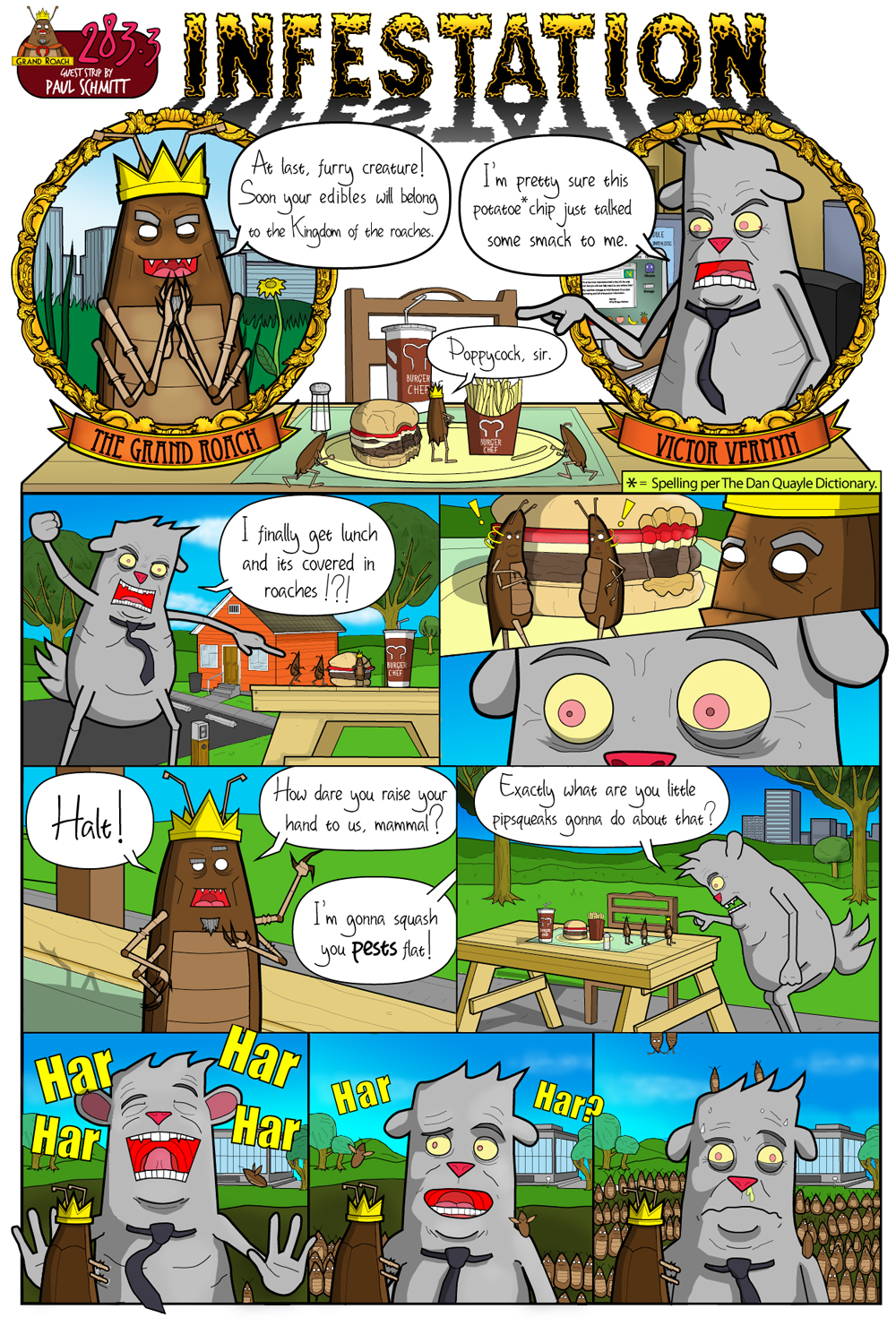
Here is my guest comic page with the Roaches happily spoiling Victor Vermyn's lunch break. It that will be appearing at John Hageman's Social Vermyn.com webcomic this week, the week of June 28th.
More Roaches pages are heatedly underway for the full-color digital edition of the Roaches book available this Fall. Please subscribe and follow to keep these pages coming!
The Most Important Comic Book Ever Published Just Got More Important-er Artist to world: "I have been to the mountaintop. It is covered in bugs."
Announcing a new edition of my first book to be published this soon from my small press imprint Gargantuan Media. This book updates the art and story from the first edition and demonstrates how much I've learned in two years time. As for now, I'm planning on a full-color 50 to 70 page graphic novel.
Thank you to everyone who bought the first edition and stopped by my table at comic cons. I will have a new book for you guys really soon.
Copy code to add Puppets to your site:
Copy code to add Roaches to your site:
Puppets, Roaches: A Graphic Novel, Cement and The Grand Roach are all registered trademarks of Gargantuan Media. All rights reserved 2010.
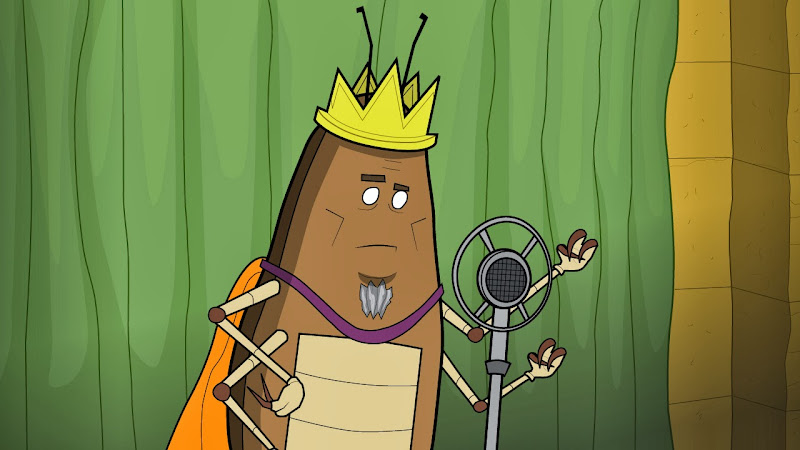
A new motion test made in Flash for the Grand Roach.
Do you want to know something? I need a new computer. The one I have renders Quicktime files from the Jurassic Era. How do I know this? Because the compressors are so badly out-dated that no matter how well I animate something (which is debatable) the compressors end up destroying the timing.
To clue you in on the "vintage" nature of my Apple G4 I bought it at the end of the 20th century. Since then it has been a print work-horse but is not cut out for more complex things like, say, rendering an 8-second clip in After Effects or Flash.
More good news. The one reliable guy I trusted to buy computers and parts from has either changed his business number or has gone out of business entirely. Un-flipping believable.
So a new Apple, an iMac I think, is in the cards for 2013. Which actually is probably the real good news here. Stick around...
Copy code to add Puppets to your site:
Copy code to add Roaches to your site:
Puppets, Roaches: A Graphic Novel, Cement and The Grand Roach are all registered trademarks of Gargantuan Media. All rights reserved 2010.
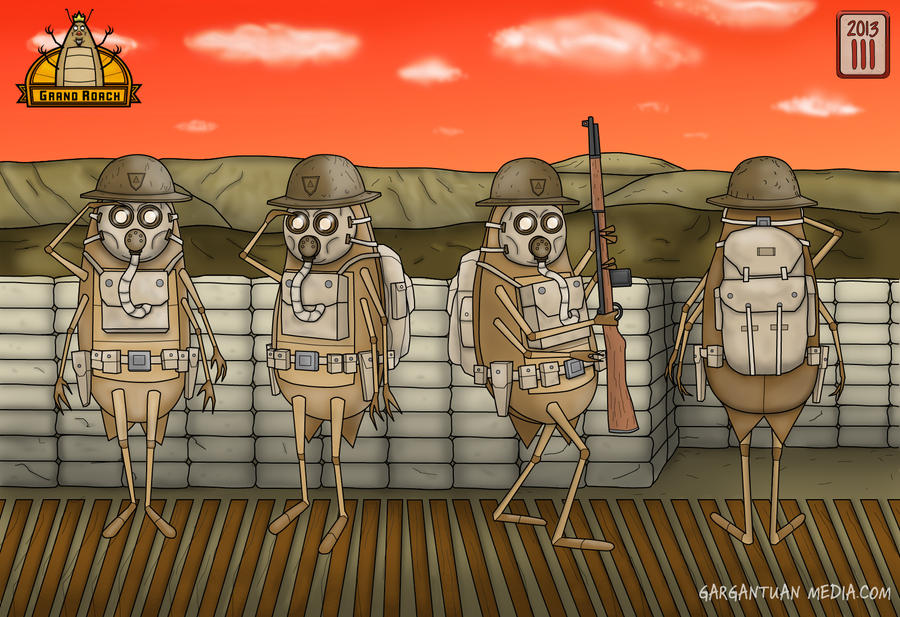
A character sheet for retro-roach soldiers from the up-coming Roaches short.
The New Year is here and with it the anniversary of Roaches. It was just over two years ago this winter when I started this title. Way back in the winter of 2010. In the beginning it was just a few gags scratched out in a sketchbook. I remember being on a wicked caffeine high in this little coffee shop in Ohio and taking a break from fighting a mean infestation of real-life roaches that were in my apt. building.
I showed the bits to a few people who, much to my surprise, really enjoyed it. So, I took up my first webcomic right there and then.
Since then, the zany Roaches found an audience on-line, a book has gotten published, it's toured a few cons and now a short is in production. This little title has gotten all grown up!
Thanks for reading and stay tuned for more mischief.
Copy code to add Puppets to your site:
Copy code to add Roaches to your site:
Puppets, Roaches: A Graphic Novel, Cement and The Grand Roach are all registered trademarks of Gargantuan Media. All rights reserved 2010.
Updated art for the Roaches with a clearly formatted "gold and bronze" style for the titles.
There have been some developments for an animated short based on my book. I've been talking to local animators, voice talent and recording studios about getting some work put in for an animated short based on the Roaches characters. I'm happy to report that this is going really well.
The short's art direction is called "Temple of Doom" due to the pose of the king of the roaches. He looks like an evil priest. This inspired the gold and bronze look for the rest of the title elements.
Once the next set of motion tests are put together I will post them in order to decide on a direction for the rest of the short. Stay tuned for more on animation news for Roaches.
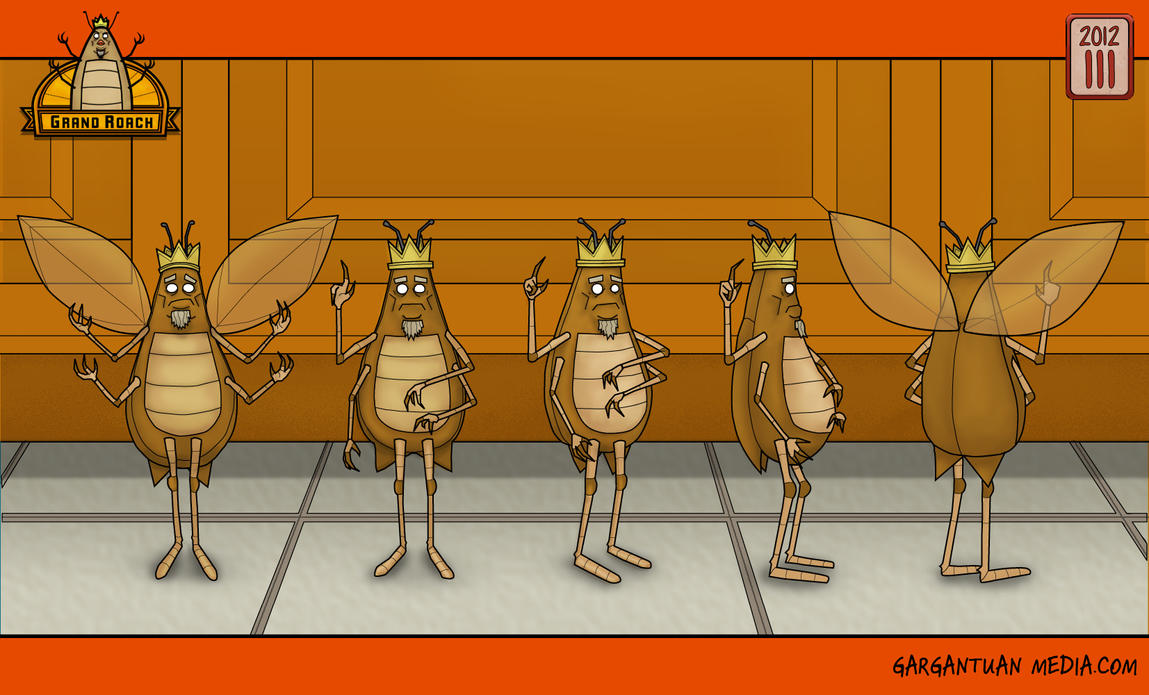
A look at the updated art for the pompous leader of the roaches, Mr. The Grand Roach.
Above is a "turn-around" showing all sides of the character. In this case, The Grand Roach - the pompous leader of the roaches. I have a few more of these character sheets to finish and then I will be able to move on and get some motion tests together.
In the meantime, I'm getting several more character sheets together with a wide variety from the insect world of roaches including Ampluex Wasps - the roaches natural predator in the wild, Pill bugs which work as messengers in the insect kingdom, and a few new roaches species including Blaberus Giganteus and Aptera Fusca. Also there is a good chance of that infamous rock 'n roller Johnny Rocko will have also a sheet produced in the near future.
Copy code to add Puppets to your site:
Copy code to add Roaches to your site:
Puppets, Roaches: A Graphic Novel, Cement and The Grand Roach are all registered trademarks of Gargantuan Media. All rights reserved 2010.
The Gargantuan Media table is loaded for war - a war on "lame" that is.
It's time for some really great news.... I'm very happy to announce that my self-publishing effort, Gargantuan Media, has been confirmed for Summit City Comic Con in Fort Wayne on May 12th 2012. Summit City is a HUGE Con with hundreds of creators. This a big development for Roaches, Gargantuan Media and myself as guy who made his first comic in 6th grade and has been into underground comics since junior high.
Summit City is being held on Saturday May 12th 2012 at the Grand Wayne Center at 120 West Jefferson Boulevard in Fort Wayne, Indiana 46802. Tickets are only $10, kids 12 and under are admitted for free. Tickets are on sale right now. Get your tickets and come see me in Artist's Alley. I am in the first row of booths at A13 will be armed with freebies for you guys and I will sketch any character from any series as a roach for only $10 bucks American!
Summit City is being held at the Grand Wayne Center 120 W. Jefferson Blvd., Fort Wayne, IN. 46802.
This is my biggest con to date and I will be loaded up with Roaches, posters and maybe even some new mini-comics. I'll also autograph books, new posters and custom merchandise with purchase. Come and get art and books from an Indiana artist at an Indiana comic con whydontcha already?
Above is a look at my current table set-up for comic cons. As you can see, it's flipping loaded. I've got Roaches books, flyers and six kinds of bookmarks, plus stickers for the comic con going public. My goal going forward is to have something for everyone - kids, hipsters, parents and teens.
Copy code to add Puppets to your site:
Copy code to add Roaches to your site:
Puppets, Roaches: A Graphic Novel, Cement and The Grand Roach are all registered trademarks of Gargantuan Media. All rights reserved 2010.
Hello to all you folks and thank you for subscribing to my first book, Roaches. It's been great for me to talk with so many of you including the small businesses and retailers that have worked with me on getting my book into local stores. I have been a fan of underground books like Zap, Weirdo as well as Mad and Cracked my whole life - so we always have a great to deal to talk about, right? Right!
Ash Con began in January of 1987 when the Hulk was Gray and an amazingly life-like robot named Ronald Reagan ruled Earth with a cruel, metallic fist. Today, in futuristic 2012, democracy has returned to the Land Of Lincoln and Ash Con has developed into a monthly Con aimed at Midwest and local creators and dealers of comics, books, gaming, cards and graphic novels - that last part is where I fit in.
I will be there all day starting at 9:30 AM. At the table. All day. Look for the bright orange banners and Roach signage. You will be able to find me just fine. And just think of it, man! Now, you will be able to complain to me about how racist/sexist/chauvinist my book is - directly to my face! It is SO gonna be on.
This self-published graphic novel is a three-part book, with glorious black-and-white illustrations including War Cry and Puppets is released as a 1st edition in an over-size magazine 8.5 x 11 format.
Roaches first run book is finally here in Indy comic and book stores. Puppets and War Cry pages included!! This book is available now on a limited first-come-first serve basis in the Greater Indianapolis area.
More on a second edition of Roaches and Puppets, the first 5 of which are on included in the first edition of Roaches at the the Puppets Blog.
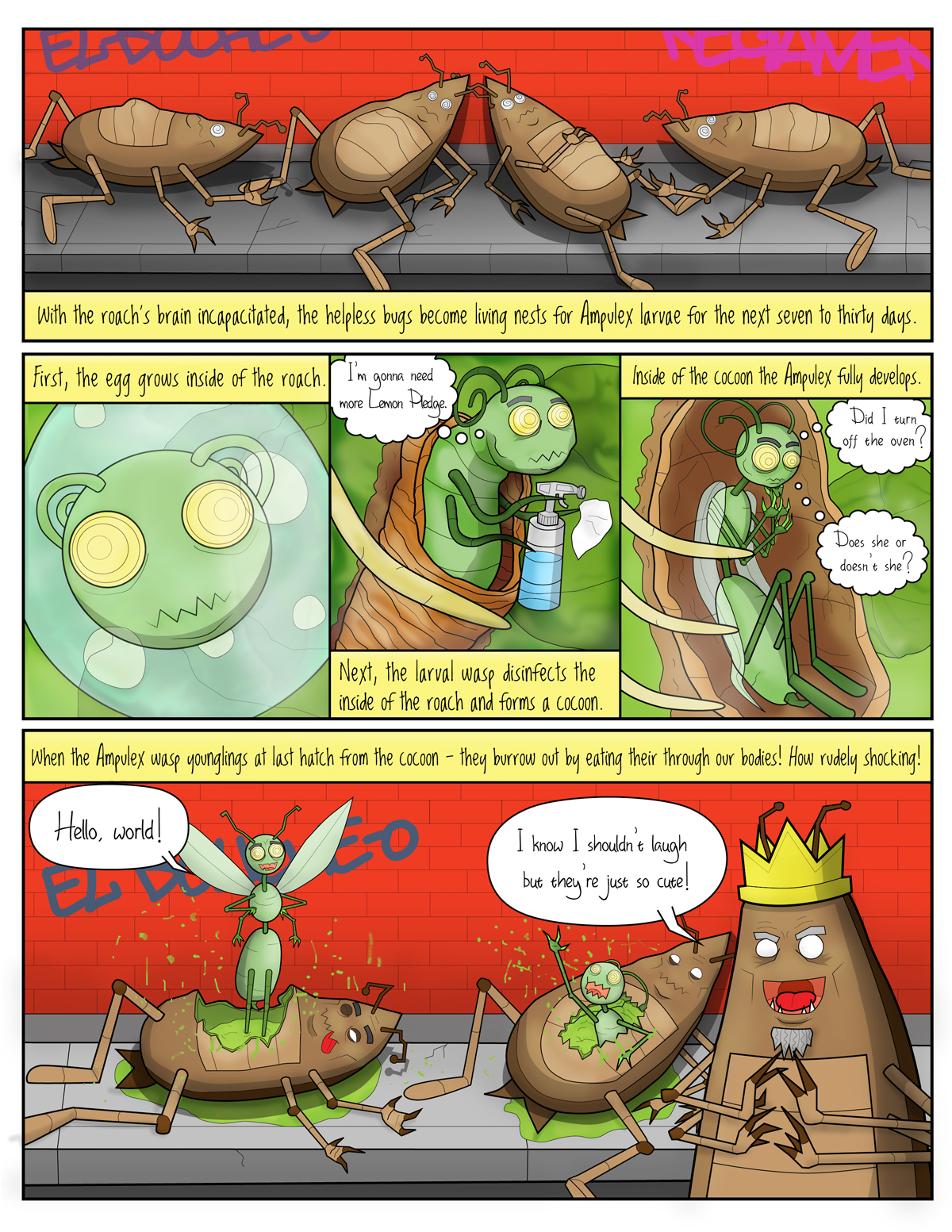
Ampulex Wasps (aka the Emerald Cockroach Wasp or Ampulex Compressa) are one of many natural predators of Roachkind and the police of the insect kingdom. We brave bugs must take great care to avoid this one especially.
Ampulex feed on us! What's worse, once we are captured - the evil Ampulex turn the still-living Roach body into a cocoon for their own hawngry younglings. How repulsive!
The dreaded Ampulex return in the second edition of the Roaches book! See them at the post here.
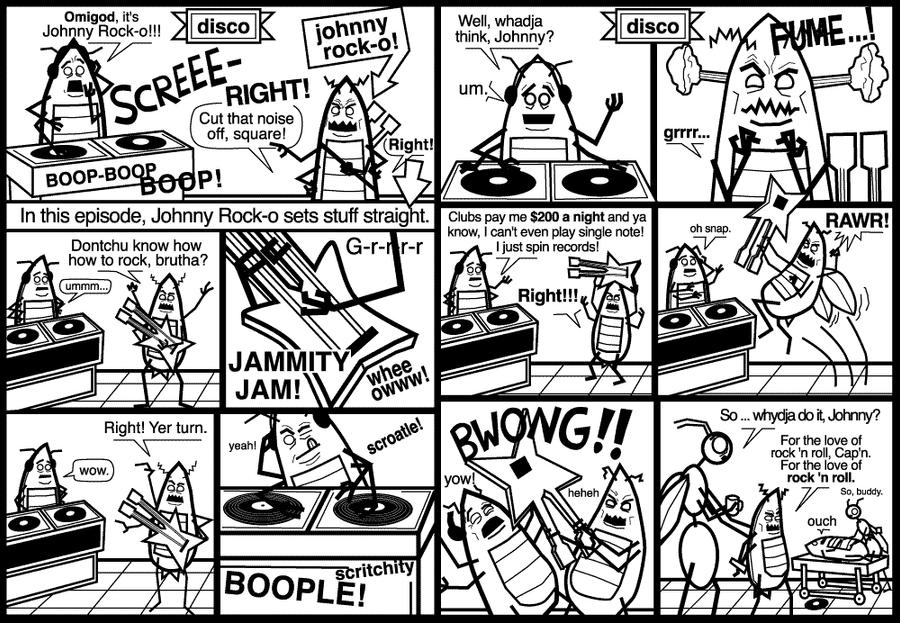
Punk legend Mr. Johnny Rock-O takes on the battle between Rock and Disco in a climactic fight for all the musical marbles - ever! Examine closely the pages above to find the ultimate winner between the two formidable champions of their respective genres, man-apes.
Copy code to add Puppets to your site:
Copy code to add Roaches to your site:
Puppets, Roaches: A Graphic Novel, Cement and The Grand Roach are all registered trademarks of Gargantuan Media. All rights reserved 2010.
Denial is one of the strongest bargaining stratagems that our proud, noble and not at all untrustworthy species possesses. Witness for yourself, worthless human, our mighty weapon at work:
A-Ha!! As you can see, we are quite unstoppable.
Now, worthless human, witness the bold spectacle of battle between two formidable forces!
Copy code to add Puppets to your site:
Copy code to add Roaches to your site:
Puppets, Roaches: A Graphic Novel, Cement and The Grand Roach are all registered trademarks of Gargantuan Media. All rights reserved 2010.